
Darksoft Neo Geo MVS Multigame Kit




$669.99
This product will be released on November 30, 2026
Product information "Darksoft Neo Geo MVS Multigame Kit"
Preorder Cancellation Notice
If you voluntarily request cancellation of this unshipped Darksoft preorder, your refund may be reduced by only the actual, documented PayPal, credit card, or other payment-processing fees HighScoreSaves cannot recover, where permitted by applicable law and payment-provider agreements. No fixed percentage or additional cancellation penalty applies. We will explain any proposed deduction and your refund amount before the voluntary cancellation is finalized.
No processing-fee deduction applies if HighScoreSaves cancels the preorder, cannot fulfill it, or a full refund is required by law, including an applicable cancellation right arising from a shipping delay.
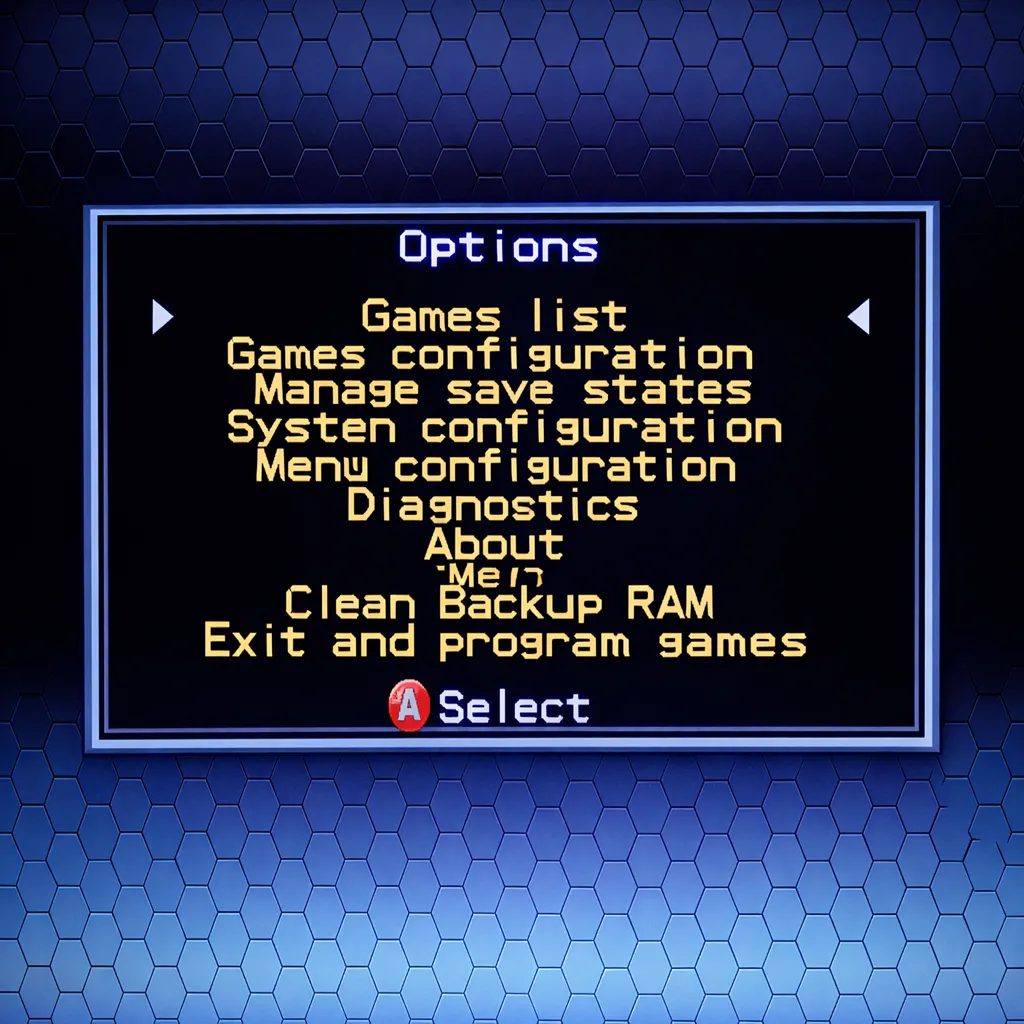
Review the Full Darksoft Preorder Cancellation Policy Before OrderingThe Darksoft Neo Geo MVS Multigame Kit is designed for compatible original SNK Neo Geo MVS arcade hardware. The cartridge combines flash memory and DDR memory to hold up to three games at the same time, effectively giving a compatible single-slot MVS motherboard three virtual game slots.
Neo Geo MVS Compatibility & Requirements
What This Kit Adds
What's Included
The kit includes the Darksoft Neo Geo MVS multigame cartridge and the hardware supplied for the documented cartridge installation. A compatible microSD card is required and is not included.
Cartridge & microSD Installation
games folder on the microSD card and place only compatible files you are legally entitled to use inside it.
Menu & Game Selection
- Hold Player 1 Start + Up for about three seconds to return to the cartridge menu.
- Hold Player 1 Start + Left or Right for about three seconds to move to the previous or next loaded slot.
- Hotkeys can be disabled through the menu configuration.
MVS Settings, Region & High-Score Storage
- Power off the MVS hardware before inserting or removing the cartridge or microSD card.
-
Do not manually edit the
SLOT1,SLOT2, orSLOT3files. - Make all game changes through the cartridge menu and its exit-and-program function.
- Use only compatible files that you are legally entitled to possess and operate.
- Review the complete manual before performing firmware updates or changing the microSD folder structure.
Shipping Information
Please note: This product ships with insurance and signature confirmation. Orders normally ship within 1–3 business days when in stock and not under a stated pre-order schedule.
United States: Flat-rate shipping is $35.99 through USPS or UPS based on package size, weight, and destination.
Two Darksoft Multigame Kits can ship together for the same flat-rate U.S. shipping price.
International: Darksoft orders ship by expedited UPS international service.
Customs duties, taxes, brokerage charges, and import fees are the customer's responsibility.
A telephone number is required for international shipments, and HighScoreSaves cannot
under-declare shipment values. Suggested tariff code: 95049080.
Darksoft Neo Geo MVS Technical Support
Technical information and community assistance are available through the Arcade Projects Neo Geo MVS and AES forum.
ArcadeProjects.com — Neo Geo MVS InformationReview the installation guide and contact HighScoreSaves or the support community before concluding that the cartridge is defective.
Darksoft Neo Geo MVS FAQ
Is this cartridge compatible with Neo Geo AES consoles?
No. This product is intended for compatible original Neo Geo MVS arcade hardware.
How many games can be loaded at once?
Up to three games can be loaded simultaneously in the three virtual slots.
Do selected games remain after power is removed?
Yes. The cartridge remembers the titles assigned to Slots 1, 2, and 3 and restores those assignments at startup.
Can I remove the microSD card while the system is powered?
No. Power off the MVS hardware before inserting or removing the cartridge or microSD card.
Is a microSD card included?
No. A compatible microSD card must be supplied separately and prepared with the required games folder.
How are game settings and high scores retained?
Original MVS backup RAM stores supported settings and high-score data. The cartridge can back up displaced information to the microSD card and restore it later.
How do I return to the cartridge menu?
Hold Player 1 Start and Up for approximately three seconds during gameplay.
Where can I review Neo Geo MVS compatibility information?
Visit the Darksoft Neo Geo MVS Multigame Kits compatibility category for motherboard, cartridge-slot, battery, and setup information.
Helpful Neo Geo MVS Resources
Get HighScoreSaves Arcade Updates
Get new Darksoft releases, restocks, arcade hardware tips, technical updates, and occasional subscriber-only offers.
Join the NewsletterLogin