
Darksoft CPS2 Key Writing Cable


$25.00
Available, processing time: 2-5 days
Product information "Darksoft CPS2 Key Writing Cable"
Darksoft CPS2 Key Writing Cable for Champion Edition Kits
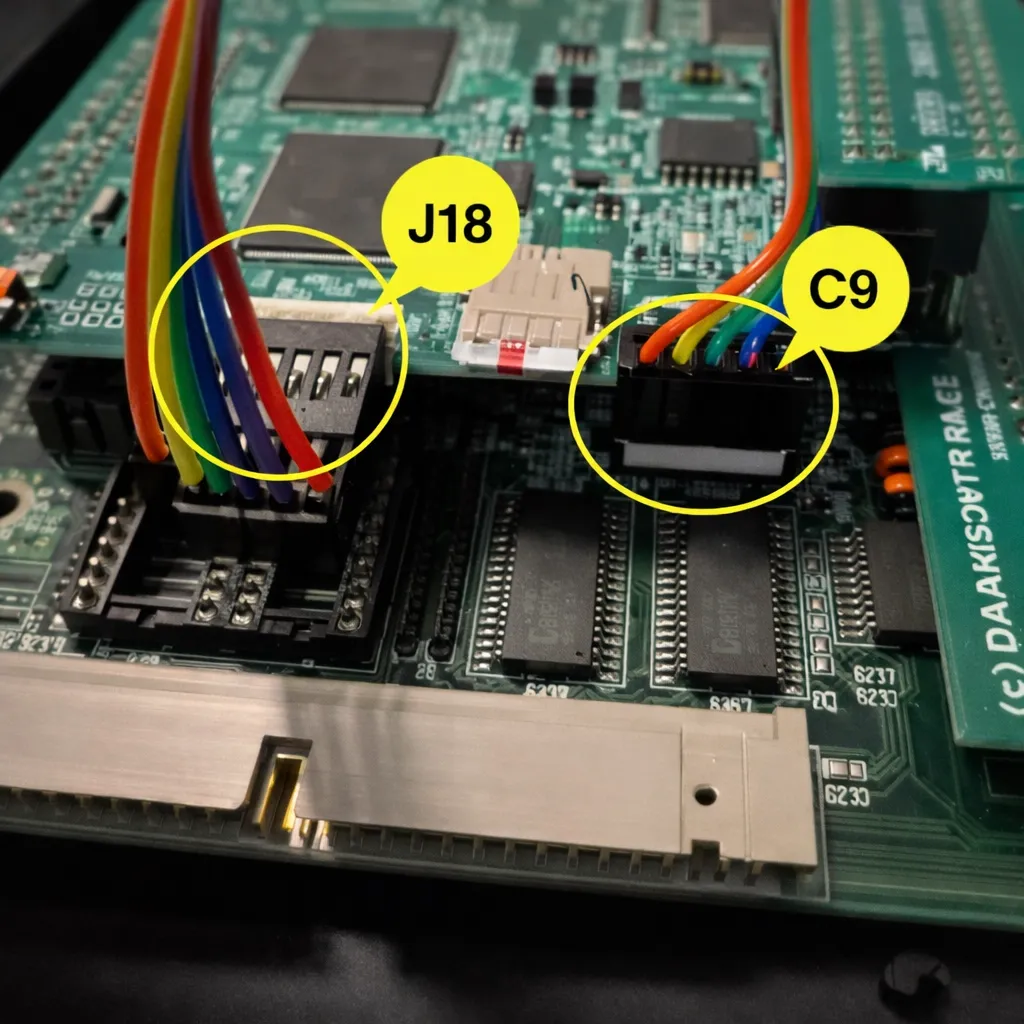
The Darksoft CPS2 Key Writing Cable connects the J18 header on the Darksoft CPS2 Champion Edition Multigame Kit to the key-writing interface on a compatible original Capcom CPS2 B-board.
This connection allows the Champion Edition kit to use compatible original, unmodified CPS2 game data. Without a key-writing connection, the installation is limited to compatible decrypted or patched game sets.
Compatibility
- Designed for the Darksoft CPS2 Champion Edition Multigame Kit.
- Connects to the J18 key-writing header on the Champion Edition main PCB.
- Supports direct connection to compatible CPS2 B-boards equipped with CN9.
- Older compatible B-board revisions without CN9 require soldered connections to CN2.
- This cable is not intended for unrelated CPS2 products or other Darksoft multigame platforms.
CPS2 B-Boards with CN9
The following recommended CPS2 B-board revisions include the factory CN9 connector used for the direct key-writing cable connection:
- 93646B-5
- 93646B-6
- 93646B-7
- 97691A-3
Connect one end of the cable to the Champion Edition multigame board’s J18 header and the other end to the B-board’s CN9 connector. Both connectors have six positions, but only pins 2 through 5 are used for the key-writing connection.
Older B-Boards Without CN9
Compatible revisions 93646B-3 and 93646B-4 do not include the CN9 connector. These boards require four wires to be soldered between the J18 cable connection and the B-board’s CN2 interface.
| Champion Edition J18 Pin | CPS2 B-Board CN2 Pin |
|---|---|
| Pin 5 | A32 |
| Pin 4 | A30 |
| Pin 3 | A31 |
| Pin 2 | A29 |
Soldering Warning
The CN2 installation should be performed only by someone experienced with precise arcade-PCB soldering. Incorrect connections, excessive heat, damaged pads, or shorted wires can damage the original B-board or multigame kit.
Follow the current Champion Edition installation guide rather than relying on wire color. Wire colors may differ, but the connector-pin positions must remain correct.
Installation Notes
- Disconnect all power before opening or handling the CPS2 board set.
- Discharge static before touching the B-board, multigame kit, or cable.
- Confirm the exact B-board revision before choosing the installation method.
- For CN9-equipped boards, align both connectors correctly before pressing them into place.
- For CN2 installations, tin the wires and complete the connections using the locations documented in the installation guide.
- Insulate soldered connections to prevent shorts.
- Route the cable so it cannot be pinched or pulled during board-shell reassembly.
What Is Included
- One Darksoft CPS2 Champion Edition key-writing cable
Important Notes
- This accessory does not function independently.
- A Darksoft CPS2 Champion Edition Multigame Kit is required.
- Key writing is used with compatible original, unmodified CPS2 game data.
- Compatible decrypted or patched game sets can be used without the key-writing connection.
- Confirm your B-board revision and installation method before ordering.
- Only use game data that you are legally entitled to possess and operate.
Visit the Darksoft CPS2 Accessories category for related installation accessories.
Login