
Wizard of Wor Free Play and High Score Save Kit


$114.00
Available, delivery time: 2-5 days
Product information "Wizard of Wor Free Play and High Score Save Kit"
Customize Your Wizard of Wor Free Play and High Score Save Kit
Build your kit exactly how you want it. Choose a Wi-Fi Enabled Kit or a Standard Save Kit. You can also add a processor and/or a 40-pin socket—optional but recommended for easy installation.
Learn More About This Kit
Click a button to view details, tips, or the installation guide.
Main Features
- Easy install: No soldering, board modifications, or special wiring. Plug in and go.
- Save your scores forever: Uses reliable serial EEPROM (no failure-prone NVRAM or batteries).
- High Score Save: Stores the Top 5 scores.
- Initials entry: Enter your initials like the original game.
- Attract Sounds: Set to 25%, 50%, or 100% of the attract rotation.
- Freeplay: No more coins or opening the coin door.
- Coin Up: Still supports coins if desired.
- Copyright message: Choose original manufacturer or Highscoresaves.
- On-screen DIP settings: Change dips via menu; no cabinet pull-out required.
- ROM Saver: No ROM board needed; program stored on the save kit for improved reliability.
- Cabinet support: Works in Upright and Cocktail cabinets.
Additional Features
- Backup & Restore: Save and restore high scores (perfect before/after parties).
- Separate score tables: Unique tables for 2–5 lives.
- Reset Button: Restart without powering off (enable in menu; press P1+P2).
- Language selection: English, German, or French.
- No ROM board required: Game runs entirely on the save kit.
- Stealth Mode: Boot directly into the game.
Important Installation Notes
- Z80 CPU must be socketed: If not, install a 40-pin socket for the kit to work.
- Read the Wizard of Wor Installation Guide (PDF) before beginning installation.
FAQ
Is installation truly plug-and-play?
Yes. No soldering required. Just ensure your Z80 CPU is socketed.
How many scores are saved?
Stores the Top 5 scores and supports initials entry.
What's the difference between Wi-Fi and Standard kits?
The Wi-Fi kit uploads scores online; the Standard kit saves locally only.
Can I back up and restore scores?
Yes. Use Backup/Restore to save and reload high scores.
Does it support multiple languages?
Yes: English, German, or French.
Will this work in my cabinet?
Yes. Works in Upright and Cocktail cabinets.
How do I use the Reset Button?
Enable in menu; press P1+P2 to reset without power-cycling.
Can I use Freeplay and still accept coins?
Yes. Freeplay and coin operation are both supported.
Do I need the original ROM board?
No. Game runs entirely from the save kit for improved reliability.
Where can I download the Installation Guide?


Login
Level up with these!
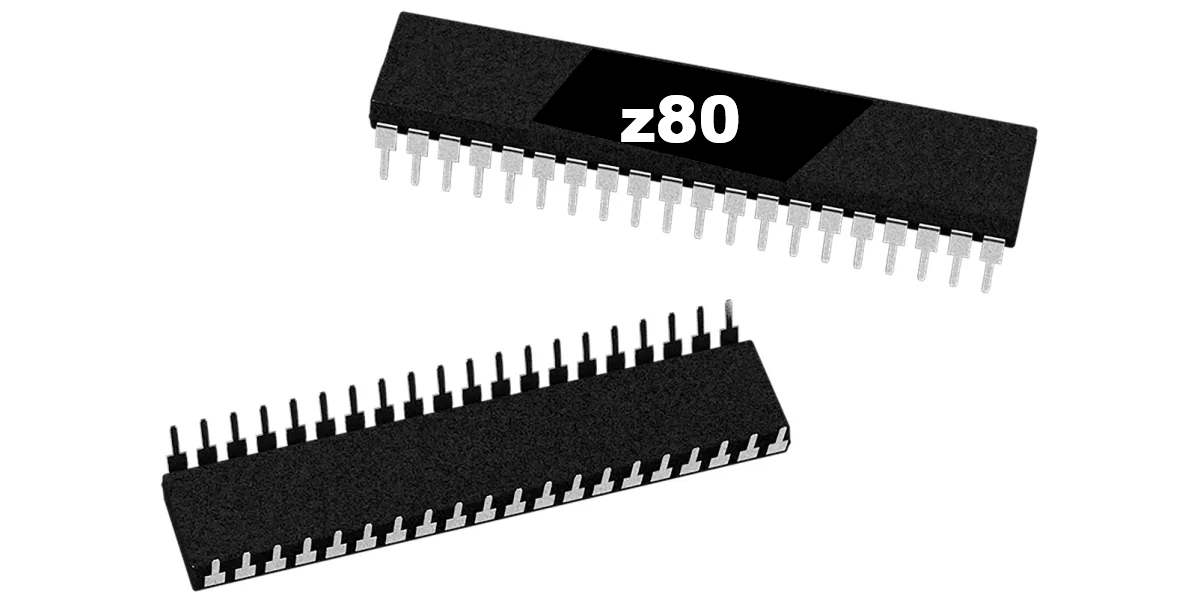
Z80 8-Bit Microprocessor (40-Pin CPU) The Z80 is a classic 8-bit microprocessor widely used in arcade machines from the late 1970s through the 1980s. This processor served as the main CPU in many arcade PCBs, executing game code, processing player inputs, and coordinating communication with memory, sound hardware, and video circuitry. The Z80 became one of the most popular processors in arcade hardware due to its reliability and expanded instruction set compared to earlier CPUs. Because of its widespread use, the Z80 is commonly found in a variety of classic arcade games and remains an essential component when repairing or restoring vintage arcade boards. This processor uses a standard 40-pin DIP (Dual In-line Package) and installs directly into a compatible socket on the arcade PCB. Replacing a faulty CPU can often resolve boot failures, lockups, or other operational issues in aging arcade hardware. Key Features Z80 8-bit microprocessor Standard 40-pin DIP package Common CPU used in many classic arcade PCBs Handles core game logic, timing, and system control Ideal for arcade PCB troubleshooting, repair, and restoration Used In Arcade Games Such As Donkey Kong Galaga Donkey Kong Jr. Frogger Galaxian Dig Dug Xevious …and many other classic arcade titles Installation Notes Installs into a standard 40-pin DIP socket on compatible arcade PCBs Ensure correct notch orientation when installing the CPU Recommended for technicians performing arcade board repair or restoration *Manufacturer brands or markings may vary.

40-Pin Socket Specifications This 40-pin DIP socket is designed for reliable installation of integrated circuits and arcade daughter boards that use a standard 40-pin layout. Using a socket allows the chip or module to be easily removed or replaced without soldering directly to the PCB, helping protect the board during upgrades, repairs, or troubleshooting. Pin Pitch: 2.54 mm (0.100″) standard DIP spacing Total Pins: 40 pins arranged in two rows (2×20) Mounting Type: Through-hole (THT) for secure soldered installation Compatibility: Designed for standard 40-pin DIP integrated circuits and modules Installation Benefit: Allows ICs to be inserted or removed without repeated soldering Use Case: Ideal for arcade PCB upgrades, ROM installations, and repair work The standard 2.54 mm (0.100″) pin spacing matches the layout used on most classic arcade PCBs and DIP integrated circuits. Once soldered to the board, the socket provides a stable connection while allowing the chip to be safely inserted and removed when needed.
Spark your interest -

Customize Your Wizard of Wor Multigame Free Play and High Score Save Kit Build your kit exactly how you want it. Choose a Wi-Fi Enabled Kit or a Standard Save Kit. You can also add a processor and/or a 40-pin socket — optional but recommended for easy installation. Learn More About This Kit Click a button below to view detailed information, setup tips, or the full installation guide. Main Features Easy install — No soldering, board modifications, or special wiring. Plug in and play. Permanent score saving — Uses serial EPROM, not failure-prone NVRAM or batteries. High Score Save — Saves Top 5 scores in Wizard of Wor and Top 21 in Robby Roto. Initials entry — Enter your initials on the scoreboard. Attract sounds — Enable sounds at 25%, 50%, or 100% of attract-mode rotations. Freeplay mode — No coins needed, but still supports coin play if desired. Coin Up — Continue using coin play if preferred. Copyright message — Choose original manufacturer or highscoresaves.com branding. Change DIP settings — Menu-driven; no need to open your cabinet to adjust switches. ROM Saver — Eliminates the need for a separate ROM board, improving reliability. Cabinet support — Works in both Upright and Cocktail cabinets. Additional Features Backup & Restore — Save high scores and restore them later, perfect for game room parties. Separate score tables — WoW saves by lives chosen; Robby Roto saves by difficulty (9 levels, 5 tables). Reset button — Restart a game without powering off (requires menu enable + P1 & P2 press). ROM Saver (stack note) — Program/ROM/RAM board must be removed; graphics RAM boards stay in place. Stealth Mode — Boot directly to the game without displaying the DIP settings menu. ROM revisions — Includes the latest ROM revisions for each supported game. Game selection on boot — Choose Wizard of Wor or Robby Roto at startup, or auto-load last played. Important Information Z80 socket required — If your Z80 isn’t socketed, install a 40-pin socket for compatibility. Installation guide — Always review the Installation Guide (PDF) before setup. Wizard of Wor on Robby Roto hardware — Due to PCB limits: no starfield background, no sparkle, no speech. Game List Wizard of Wor Robby Roto FAQ Do I need to solder anything? No. Installation is plug-and-play. If your Z80 isn’t socketed, install a 40-pin socket first. Wi-Fi vs Standard — what’s the difference? Wi-Fi kits upload/view scores online and sync to your personal page; Standard kits save locally only. Can I upgrade to Wi-Fi later? No. Wi-Fi must be populated at purchase; it cannot be added later. How many scores are saved? Wizard of Wor saves Top 5; Robby Roto saves Top 21. Are score tables separate per settings? Yes — WoW saves by lives; Robby Roto saves by difficulty level. Does it work in Upright and Cocktail cabinets? Yes — the kit supports both cabinet types. Can I back up and restore high scores? Yes — perfect before and after parties or tournaments. How do I use the Reset button? Enable it in the menu; then press Player 1 + Player 2 simultaneously. Do I still need the original ROM board? No — remove the Program/ROM/RAM board; keep graphics RAM boards installed. Where can I find the Installation Guide? Wizard of Wor Multigame Installation Guide (PDF) Resources Wizard of Wor Multigame — Installation Guide (PDF) HighScoreSaves YouTube Channel — Installation Tips HighScoreSaves Facebook Page HighScoreSaves eBay Store

Customize Your Gorf Free Play and High Score Save Kit Build your kit exactly how you want it. Choose a Wi-Fi Enabled Kit or a Standard Save Kit. You can also add a processor and/or a 40-pin socket—optional but recommended for easy installation. Learn More About This Kit Click a button to view details, tips, or the installation guide. Main Features Easy installation — No soldering, board modifications, or special wiring. Plug in and go. Permanent score saving — Uses a serial EPROM, not failure-prone NVRAM or batteries. High Score Save — Saves the Top 5 scores. Initial entry — Enter and save your initials. Attract sounds — Enable audio during attract-screen rotations (25%, 50%, or 100%). Freeplay — No coins required; Coin Up still supported. Copyright message — Set to the original manufacturer or HighScoreSaves. Menu-driven DIP settings — Change options without removing the board. ROM saver — Optionally remove program ROMs to reduce power use. Cabinet support — Works in Upright or Cocktail cabinets. Additional Features Backup & restore — Save and restore high scores; ideal before and after parties. Separate score tables — Different high-score tables for lives/difficulty settings (2, 3, 4, or 5 lives). Reset button — Restart a game without powering off (enable in menu; press P1 + P2). Language — Select English or German. No ROM board needed — Remove Program/ROM/RAM board; keep the two graphic RAM boards installed. ROM saver note — Program/ROM/RAM board must be removed; graphic RAM boards stay in the stack. “Hard Romset” mode — Galaxian level and others can be set to Hard Mode. Stealth Mode — Boot straight to game without showing the DIP Settings menu. Improved self-test — Light test, RAM test, and simple pattern board test added. Important Notes Ensure your Z80 is socketed; otherwise install a 40-pin socket for the kit to work. Read the Gorf Installation Guide (PDF) before you begin. FAQ Does this kit require soldering? No. It is fully plug-and-play with no soldering, board modifications, or special wiring needed. How many high scores are saved? The kit permanently saves the Top 5 scores on your Gorf machine. Can I still use Coin-Up if I enable Freeplay? Yes. Freeplay is supported, and you can still enable Coin-Up if desired. What’s special about the ROM saver? You can remove the Program/ROM/RAM board for reliability and reduced power use. Only the two graphic RAM boards need to remain. Does the kit support multiple languages? Yes. You can select either English or German in the menu settings. What is “Hard Romset” mode? This optional mode sets Galaxian and other levels to Hard difficulty for added challenge. Where can I download the Installation Guide? Download it here: Gorf Installation Guide (PDF) . Resources Gorf Free Play and High Score Save Kit — Installation Guide (PDF) HighScoreSaves YouTube Channel — Installation Tips HighScoreSaves Facebook Page HighScoreSaves eBay Store

Customize Your Space Zap Free Play and High Score Save Kit Build your kit exactly how you want it. Choose a Wi-Fi Enabled Kit or a Standard Save Kit. You can also add a processor and/or a 40-pin socket — optional but recommended for easy installation. Learn More About This Kit Click a button to view details, tips, or the installation guide. Main Features Easy install: No soldering, board modifications, or special wiring—plug in and go. Save your scores forever: Uses serial EEPROM (no batteries or NVRAM). High Score Save: Saves the Top 5 scores with initials. Initial entry: Enter your initials for saved scores. Attract sounds: Adjustable at 25%, 50%, or 100%. Freeplay: No more opening the coin door. Coin Up: Still supports coins or tokens. Copyright: Choose manufacturer or Highscoresaves branding. On-screen DIP settings: Menu-driven—no cabinet access needed. ROM Saver: Original ROM board not required. Cabinet support: Works in Upright or Cocktail cabinets. Additional Features Backup & Restore: Back up and restore high scores. Separate score tables: 2, 3, 4, and 5 lives each have their own table. Reset button: Restart without powering off (requires menu enable). No ROM board needed: Program/ROM/RAM board removed; graphics RAM stays. Stealth Mode: Boots straight into the game. Important Installation Notes Socketed Z80 required: Install a 40-pin socket if needed. Read the Space Zap Installation Guide (PDF) before setup. FAQ Do I need to solder anything? No, this kit is plug-and-play. Does it save scores permanently? Yes, stored in serial EEPROM—never lost. How many scores are saved? Top 5 scores with initials. Does it support initials entry? Yes, initials entry supported. Can I enable Freeplay? Yes, Freeplay + Coin Up both supported. Does it support attract sounds? Yes—25%, 50%, or 100% of attract rotations. Cabinet support? Works in Upright or Cocktail cabinets. What is Stealth Mode? Boots straight into the game—no menu shown. Do I need the ROM board? No. Program/ROM/RAM board removed; graphics RAM stays. Where is the installation guide? Space Zap Installation Guide (PDF) Resources Space Zap — Installation Guide (PDF) HighScoreSaves YouTube Channel — Installation Tips HighScoreSaves Facebook Page HighScoreSaves eBay Store

Tapper Multigame Free Play and High Score Save Kit Includes Tapper • Timber • Root Beer Tapper • Simpsons Tapper Add free play and high score saving to your original Tapper or Timber PCB with this Tapper Multigame Free Play and High Score Save Kit. Designed for authentic arcade hardware with no emulation, this multigame upgrade lets you switch between Tapper, Timber, Root Beer Tapper, and Simpsons Tapper while preserving original gameplay on supported boards. This kit is built for the Tapper hardware family and supports cabinet-specific control behavior automatically. Whether you are restoring an original machine or upgrading a game room favorite, this kit adds modern convenience while keeping the feel of original arcade hardware intact. Learn More About This Kit Click a button below to compare options, view setup tips, or open the installation guide. Compare Wi-Fi vs Standard Tips and Tricks PDF View Installation Guide Customize Your Kit Build your kit exactly how you want it. Choose a Wi-Fi Enabled Kit or a Standard Save Kit. You can also add a processor and a 40-pin socket for easier installation on supported boards. Wi-Fi Enabled Kit: Adds online score features and expanded connectivity options. Standard Save Kit: Saves scores locally without Wi-Fi features. Optional Z80 Processor: Helpful if your board is missing the required CPU. Optional 40-Pin Socket: Recommended if your PCB is not already socketed. Main Features Easy installation: Plugs into a supported Tapper or Timber PCB with no soldering required. High score saving: Stores Top 10 scores, with an option to save Top 3 instead. Serial EEPROM memory: No batteries or failing NVRAM to worry about. Separate high score tables: Individual score tables for each game and menu setup. Attract sounds: Adjustable to 25%, 50%, or 100%. Free play support: Eliminates the need to open the coin door for credits. Coin-up support: Still works with coins or tokens if preferred. Attract mode protection: Helps reduce monitor burn during idle time. Menu-driven settings: On-screen setup means no cabinet opening for normal adjustments. ROM saver feature: Original ROMs can be removed and safely stored. Cabinet support: Works in Upright, Cocktail, and Cabaret cabinets. Backup and restore: Save and restore scores before service, transport, or events. Reset button support: Soft restart without turning cabinet power off. Latest ROM revisions: Uses current game revisions included with the kit. Selectable boot game: Choose Tapper, Timber, Root Beer Tapper, or Simpsons Tapper at startup. Control Mapping by Cabinet Type This is the Tapper and Timber multigame kit you have been waiting for. Control behavior changes automatically depending on cabinet type, helping keep each game playable on original hardware layouts. If installed in a Tapper cabinet while playing Timber 1-player support for Timber Tap and move joystick left = chop left Tap and move joystick right = chop right If installed in a Timber cabinet while playing Tapper Tapper uses Player 1 joystick Left/Right chop buttons act as tap Supports 2-player simultaneous Timber Optional Features High Scores button: Quickly view saved score tables for the selected game. All Global High Scores button: Ideal for Wi-Fi enabled kits that connect with supported online leaderboard features. Choose starting lives. Select bonus thresholds: 10,000, 20,000, 40,000, or 80,000. Separate high score tables for each lives setting. Choose original Midway logos or website branding. Use normal DIP behavior or custom on-screen setting menus. Lock sub-menus to protect settings from guests. Stealth Mode: Boot to the last played game or to a selected default title. All Global High Scores Game List Tapper Timber Root Beer Tapper Simpsons Tapper Important Installation Notes Socketed Z80 required: Install a 40-pin socket if your PCB is not already socketed. Read the installation guide first: Review the Tapper Multigame Installation Guide before setup. Optional parts may simplify installation: Adding the processor and socket can save time on boards missing these components. Just the FAQ's Do I need to solder anything? No. This kit is designed to be plug-and-play on supported boards. Does it save my high scores? Yes. It saves Top 10 scores by default, with an option for Top 3 if preferred. How does control mapping work? The kit automatically adjusts control behavior depending on whether it is installed in a Tapper or Timber cabinet. Can I still use coins? Yes. Free play and normal coin-up operation are both supported. Does it support all cabinet types? Yes. Upright, Cocktail, and Cabaret cabinets are supported. What games are included? Tapper, Timber, Root Beer Tapper, and Simpsons Tapper. Can I back up and restore scores? Yes. Backup and restore features are built in. What is Stealth Mode? Stealth Mode lets the kit boot directly to the last played game or to a selected default title. What processor is required? A socketed Z80 CPU is required for installation. Where is the installation guide? Tapper Multigame Installation Guide (PDF) Resources Tapper Multigame Installation Guide (PDF) HighScoreSaves YouTube Channel HighScoreSaves Facebook Page Official HighScoreSaves eBay Store

Customize Your Rally X Multigame High Score Save Kit Build your kit exactly how you want it. Choose a Wi-Fi Enabled Kit or a Standard Save Kit. You can also add a processor and/or a 40-pin socket—optional but recommended for easy installation. Learn More About This Kit Click a button to view details, tips, or the installation guide. Main Features Easy install: No soldering, board modifications, or special wiring—plug in and go. Save your scores forever: Uses a serial EEPROM (not failure-prone NVRAM or batteries). High Score Save: Stores the Top 5 scores. Copyright: Switch between NAMCO or HighScoreSaves branding on the attract screen. Attract sounds: Enable at 25%, 50%, or 100% of attract-screen rotations. Free Play: Start games without coins or opening the coin door. Coin Up: Coins/tokens still supported if desired. Attract mode: Reduce screen burn—no more static screens. Menu-driven DIP settings: Change settings on-screen—no cabinet pull-out. ROM Saver: Optionally remove original program ROMs to save power. Cabinet support: Works in upright or cocktail cabinets. Additional Features Initial entry: Enter initials with your high score. High-score tables with initials: Save up to 16 combinations of tables (lives and bonus options). Important Installation Notes Graphics ROM setting: After installing the Rally X save kit, open the settings menu and set your GFX ROMs option to “Multikit”. Ensure your Z80 is socketed. If not, install a 40-pin socket for the kit to work. Read the installation guide (PDF) before installing. Game List Rally X New Rally X Jr. Rally X FAQ Do I need to solder anything?No, this is a plug-and-play kit—no soldering or board mods required. Will my scores be saved permanently?Yes. Scores are stored in EEPROM and do not require batteries. How many high scores are saved?Top 5 scores are saved with initials. Can I switch the attract-screen branding?Yes—choose NAMCO or HighScoreSaves branding in the menu. Does it support Free Play and coins?Yes—enable Free Play or continue to Coin Up with tokens/coins. Does this help reduce screen burn-in?Yes—attract mode prevents static screens to minimize burn-in. How do I change DIP switch options?All options are menu-driven on-screen—no cabinet pull-out needed. What is the “Multikit” GFX ROMs setting?After install, set GFX ROMs to Multikit so graphics map correctly for the multigame kit. Do I need a socketed CPU?Yes—the Z80 must be socketed. If not, add a 40-pin socket first. Where can I download the installation guide? You can download it here: Rally X Multigame Installation Guide (PDF) Resources Rally X Multigame High Score Save Kit — Installation Guide (PDF) HighScoreSaves YouTube Channel — Installation Tips HighScoreSaves Facebook Page HighScoreSaves eBay Store