
ARpiCADE Mini Raspberry Pi JAMMA Adapter

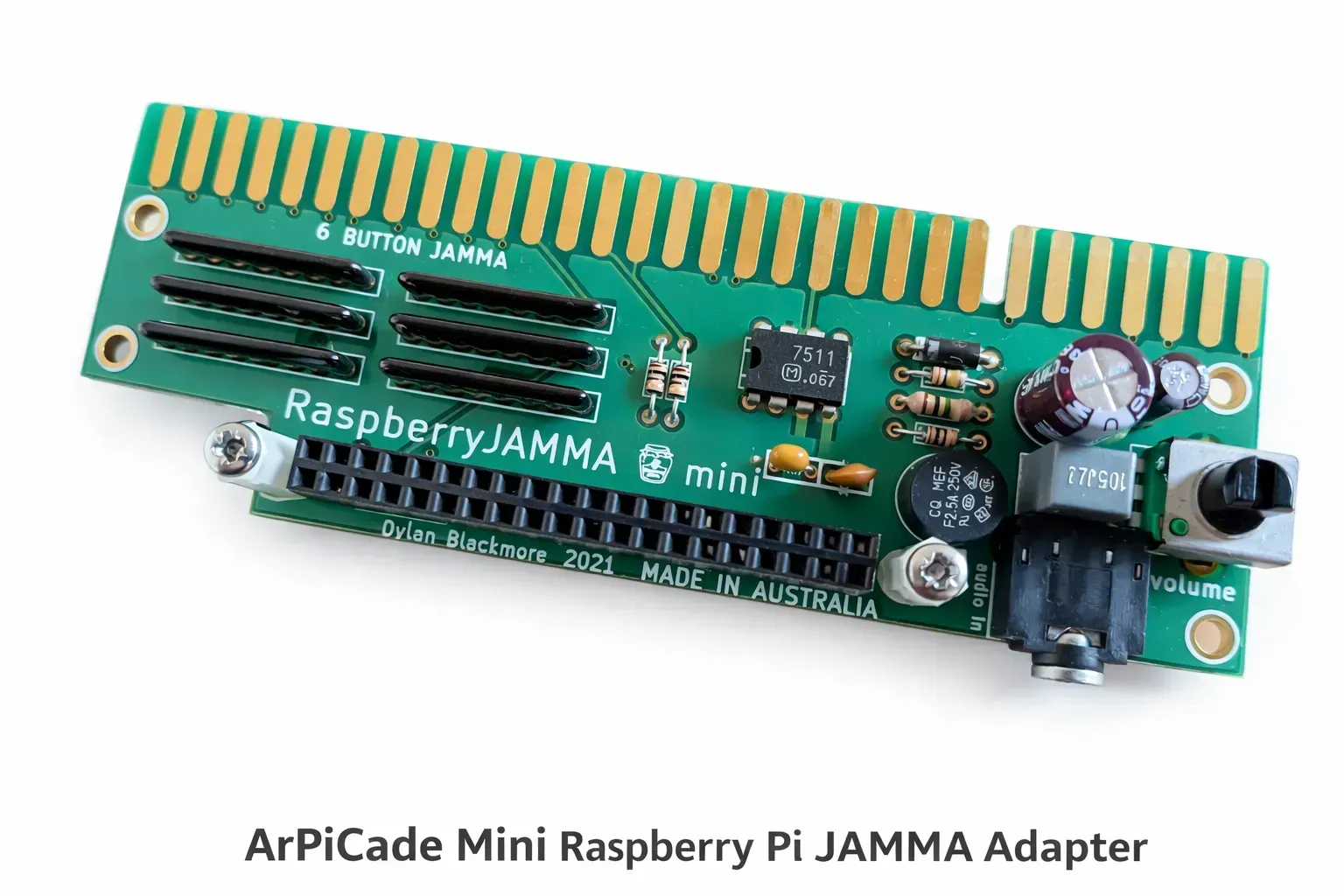


Product information "ARpiCADE Mini Raspberry Pi JAMMA Adapter"
ARpiCADE Mini Raspberry Pi JAMMA Adapter Features and Compatibility
The ARpiCADE Mini Raspberry Pi JAMMA Adapter is a compact interface designed for compatible JAMMA arcade cabinets using modern high-resolution LCD or LED displays. It connects a Raspberry Pi to the cabinet’s existing JAMMA wiring, controls, power supply, speakers, and monitor without requiring a full-size multigame board.
HighScoreSaves is the official United States distributor for ARpiCADE. The Mini is intended for streamlined one- or two-player installations, modern multicade builds, and compatible cabinets being upgraded from systems such as Pandora’s Box.
Designed for Modern Arcade Displays
The ARpiCADE Mini is intended for compatible high-resolution LCD and LED displays. HDMI video is provided directly from the Raspberry Pi. VGA installations require a compatible HDMI-to-VGA DAC or converter and the correct ARpiCADE software configuration.
ARpiCADE software normally uses low-resolution settings by default. The software configuration must be changed to a compatible high-resolution output before the system is used with the Mini.
JAMMA Cabinet Connection
The adapter connects to a compatible JAMMA harness and uses the cabinet’s regulated arcade power supply. The Mini requires both 5-volt and 12-volt connections through the JAMMA harness. The 12-volt supply powers the onboard amplified audio circuit.
For Raspberry Pi 3 and Raspberry Pi 4 installations, the official manual recommends approximately 5.1 volts measured at the JAMMA edge. The cabinet power supply and wiring must be able to provide stable current without excessive voltage drop.
Six-Button JAMMA Control Layout
The ARpiCADE Mini carries six action buttons per player through a fully populated JAMMA-style edge connector. This modified six-button arrangement is common in many newer cabinets and multicade harnesses.
If the cabinet harness uses JAMMA pins 27 or “e” as ground connections, those grounds must be moved to pins 28 or “f” so the additional button inputs can be used. Confirm the cabinet harness pinout before connecting the adapter.
Audio Output
The Mini provides amplified mono audio through standard compatible JAMMA speaker wiring. Cabinets wired for Neo Geo MVS-style stereo at the JAMMA edge must be converted to the appropriate mono speaker arrangement.
Stereo installations can bypass the onboard mono amplifier and use an external stereo amplifier. HDMI installations use the Raspberry Pi analog audio output, while VGA DAC configurations can use the DAC’s audio output.
Raspberry Pi and Software Compatibility
- Raspberry Pi 3B or 3B+ with compatible ARpiCADE Pi 3 software
- Raspberry Pi 4 with the appropriate supported ARpiCADE software
- Compatible SD card
- Correct high-resolution software configuration
- Compatible JAMMA cabinet or Super Gun
- HDMI display or compatible VGA display and DAC
HighScoreSaves-provided game-list images are intended for Raspberry Pi 3B and 3B+ unless the selected option specifically states otherwise. Raspberry Pi 4 installations require compatible Pi 4 software and may require additional configuration.
Game-List Image Options
Available SD card image options may include:
- 397-game vertical cocktail configuration
- 708-game vertical upright configuration
- 1,679-game horizontal upright configuration
- 5,025-game horizontal upright arcade and console configuration
- LaserDisc Trilogy upright configuration
Confirm the cabinet orientation, monitor connection, Raspberry Pi model, control layout, and selected image before ordering. Digital software images are not returnable, although exchanges may be available when an image is defective.
Four-Player Compatibility
The ARpiCADE Mini is not compatible with the ARpiCADE four-player expansion board. Choose the full-size ARpiCADE multiplayer system when Player 3 and Player 4 support is required.
Important Installation Precaution
Install the Raspberry Pi and connect the JAMMA harness only while the cabinet is powered off. In the standard parts-side-up JAMMA orientation, the Mini’s component and silkscreen side faces upward and the attached Raspberry Pi is positioned upside down.
What Is Included?
- One ARpiCADE Mini Raspberry Pi JAMMA Adapter
- Selected monitor configuration or DAC option
- Selected SD card image, when purchased
- Selected Raspberry Pi option, when purchased
Arcade cabinet, monitor, controls, external stereo amplifier, SD card, Raspberry Pi, and other accessories are not included unless specifically listed with the selected option.
ARpiCADE Mini Raspberry Pi JAMMA Adapter FAQs
Does the ARpiCADE Mini support an original CGA arcade monitor?
No. The Mini is designed for high-resolution HDMI or compatible VGA displays and does not provide low-resolution CGA arcade-monitor output.
Is a VGA converter required?
Only for a VGA display. An HDMI display connects directly to the appropriate Raspberry Pi HDMI output, while VGA requires a compatible DAC or converter.
Is a Raspberry Pi included?
Only when a Raspberry Pi is selected as a product option. The base Mini adapter does not automatically include one.
Does it support six-button games?
Yes. The Mini uses a six-button arrangement through the JAMMA edge. The cabinet harness and control-panel wiring must use the compatible fully populated layout.
Can the four-player expansion be added later?
No. The ARpiCADE Mini is not compatible with the four-player expansion. Use the full-size ARpiCADE multiplayer adapter when three- or four-player support is needed.
Where can I find the installation manual?
Review the official RaspberryJAMMA Mini Manual before installing the Raspberry Pi, configuring the display, or modifying the JAMMA harness.
Where can I get ARpiCADE software and technical support?
Visit the official ARpiCADE support site for current software releases, documentation, configuration information, and community support.
ARpiCADE Mini Upright and Cocktail SD Card Image Game Lists
Review the games included with each available ARpiCADE Mini upright or cocktail SD card image before selecting an image option. Each searchable PDF opens in a new browser tab.
708-Game Vertical Upright Image
A 708-game arcade collection configured for an upright cabinet with a vertical display.
View 708-Game List PDF1,679-Game Horizontal Upright Image
A 1,679-game arcade collection configured for an upright cabinet with a horizontal display.
View 1,679-Game List PDF5,025-Game Horizontal Upright Image
A larger 5,025-game arcade and console collection for an upright cabinet with a horizontal display.
View 5,025-Game List PDFLaserDisc Trilogy Upright Image
An upright LaserDisc collection featuring Dragon’s Lair, Dragon’s Lair 2, and Space Ace.
View LaserDisc List PDF397-Game Vertical Cocktail Image
A 397-game vertical cocktail collection with game titles, release years, and manufacturers.
View 397-Game List PDFLogin
1 review
July 1, 2026 6:04 PM
Outstanding
The ARpiCADE VGA Mini was easy to set up, and the VGA output looks crisp on my arcade monitor. The interface is simple to navigate, performance is smooth, and everything worked right out of the box. I was impressed by the build quality and the excellent support I received before purchasing. It's a fantastic option for anyone looking for a compact arcade gaming solution.