
Free Play and High Score Save Kits
Explore High Score Save Kits
Highscoresaves.com is the place to get your Free Play and High Score Save Kits—plug-and-play upgrades for classic arcade cabinets. Most kits are customizable at checkout (choose Wi-Fi Enabled to upload scores online to arcadehighscores.com and a personal page created just for you, or Standard for local saving scores only), and many save kits include features like attract-mode sounds, true Free Play with optional coin-up, on-screen menu/DIP settings, and per-lives high-score tables; select listings also offer optional CPU and 40-pin socket add-ons for easier installs.
Shipping
U.S. orders typically ship via USPS or UPS and dispatch in 48–96 hours. International shipping is available worldwide (UPS expedited 2–5 business days, see shipping page link; customs/taxes may apply).

Customize Your Scramble Multigame Free Play and High Score Save Kit Build your kit exactly how you want it. Choose a Wi-Fi Enabled Kit or a Standard Save Kit. You can also add a processor and/or a 40-pin socket—optional but recommended for easy installation. Learn More About This Kit Click a button to view details, tips, or the installation guide. Features Easy install – No soldering, board modifications, or special wiring. Plug in and go! Save your scores forever – Uses a serial EPROM, not failure-prone NVRAM or batteries. High Score Save – Saves the Top 10 scores with initials. Choose your game – Scramble, Super Cobra, Anteater, Frogger, Amidar, Armored Car, Turtles, and The End. Attract Sounds – Adjustable at 25%, 50%, or 100%. Freeplay – No more coins or opening the coin door. Coin Up – Still supports coins if desired. Attract Mode – Minimize screen burn with dynamic screens. Change DIP settings – Menu-driven; no need to open the cabinet. ROM Saver – Optionally remove original program ROMs to save power. Cabinet Support – Works in Upright cabinets. Additional Features Backup and Restore – Save and restore high scores (perfect before/after parties). Separate score tables – Different tables for 2, 3, or 4 lives settings. Reset Button – Restart a game without powering off (requires enabling in menu). Self-Test – Accessible via the main menu or by setting all PCB DIP switches OFF. Continue? – Enable or disable at will. God Mode – Unlimited lives (scores won’t save). Stealth Mode – Make the kit look stock at boot up. Fixed Inputs – Upright-only; Player 1 inputs used (no rewiring needed). Important Ensure your Z80 is socketed. If not, install a 40-pin socket for kit compatibility. Read the Scramble Multigame Installation Guide (PDF) before installing. Scramble – Extended scoring up to 9,999,990 points. Choose difficulty between Konami and Stern (Stern ROMs drain fuel faster). Frogger – Extended scoring up to 9,999,990 points; music bug fixed with improved tune. Known Differences – The End: bullets are dots; Frogger: blue street; Anteater: blue tunnels. Game List Scramble Super Cobra Anteater Frogger Amidar Armored Car Turtles The End FAQ Do I need to solder anything?No, this kit is plug-and-play. No soldering or board modifications required. Does it save scores permanently?Yes, high scores are stored in serial EPROM and don’t require batteries. How many scores are saved?The kit saves the Top 10 scores with initials for each game. Can I switch between games?Yes — select from Scramble, Super Cobra, Anteater, Frogger, Amidar, Armored Car, Turtles, or The End. Does it support attract sounds?Yes, adjustable at 25%, 50%, or 100%. Can I enable Freeplay?Yes — Freeplay is supported, but Coin Up can still be used. Does it support backup and restore?Yes, scores can be backed up and restored at any time. What special modes are included?God Mode, Stealth Mode, Continue option, and more. What are the known differences?The End: dot bullets; Frogger: blue street; Anteater: blue tunnels. Where can I download the installation guide? Scramble Multigame Installation Guide (PDF) Resources Scramble Multigame Free Play and High Score Save Kit — Installation Guide (PDF) HighScoreSaves YouTube Channel — Installation Tips HighScoreSaves Facebook Page HighScoreSaves eBay Store

Scramble | Super Cobra Multigame Instruction Magnet This magnet applies and removes easily. It adheres to any ferrous metal (steel control panels, coin doors, etc.). For non-metal surfaces, use double-sided mounting tape (not included). Specifications Size: 3″ (L) × 2″ (W) Finish: Soft-laminated top Back: Strong magnetic backing

Customize Your Scramble Free Play and High Score Save Kit Build your kit exactly how you want it. Choose a Wi-Fi Enabled Kit or a Standard Save Kit. You can also add a processor and/or a 40-pin socket—optional but recommended for easy installation. Learn More About This Kit Click a button to view details, tips, or the installation guide. Main Features Easy install: No soldering, board modifications or special wiring. Plug in and go! Save your scores forever: Uses serial EEPROM (not battery-dependent NVRAM). High Score Save: Saves the Top 10 scores. Copyright: Toggle between original manufacturer logo and HighScoreSaves. Freeplay: Start games with no coins required. Coin Up: Still supports coins if you prefer. Attract Mode: Reduces screen burn by avoiding static screens. Menu-driven DIP settings: No cabinet pulling or DIP-switch flipping. ROM Saver: Remove original program ROMs if desired. Cabinet Compatibility: Works in Upright and Cocktail cabinets. Additional Features Backup & Restore: Back up scores before parties—restore afterward. Separate score tables: Unique high-score tables for 2, 3, or 4 lives settings. Fast Boot: Self-test available via menu or by setting all PCB DIP switches to OFF. Important Installation Notes Socketed Z80 required: If your Z80 isn’t socketed, install a 40-pin socket. Read the Scramble Installation Guide (PDF) before installing. FAQ Do I need to solder anything? No—this kit is plug-and-play. No soldering or modifications required. Does it save scores permanently? Yes—scores are saved in serial EEPROM and retained without power. How many scores does it save? This kit saves the Top 10 scores. Can I use Freeplay? Yes—Freeplay mode is fully supported. Does Coin Up still work? Yes—coin play remains supported. Does it help prevent screen burn? Yes—attract mode minimizes static images. Can I switch logos? Yes—toggle between manufacturer and HighScoreSaves attract logos. Does it support Backup & Restore? Yes—back up and restore scores anytime. Will it work in cocktail cabinets? Yes—supports both Upright and Cocktail cabinets. Where do I download the installation guide? Scramble Installation Guide (PDF) Resources Scramble Free Play and High Score Save Kit — Installation Guide (PDF) HighScoreSaves YouTube Channel — Installation Tips HighScoreSaves Facebook Page HighScoreSaves eBay Store

Customize Your Silk Worm Free Play and High Score Save Kit Build your kit exactly how you want it. Choose a Wi-Fi Enabled Kit or a Standard Save Kit. You can also add a processor and/or a 40-pin socket—optional but recommended for easy installation. Learn More About This Kit Click a button to view details, tips, or the installation guide: Features Easy install – No soldering, board modifications, or special wiring. Plug in and go! Save your scores forever – Uses reliable serial EEPROM (not failure-prone NVRAM or batteries). High Score Save – Saves the Top 10 scores and initials. Copyright – Switch the attract-screen logo between the original manufacturer and Highscoresaves. Freeplay – No more coins or opening the coin door. Coin Up – Still supports coins if desired. Attract Sounds – Set to 25%, 50%, or 100% of the attract rotation. Attract Mode – Minimizes screen burn by avoiding static screens. On-screen DIP settings – Menu-driven; no cabinet pulling to flip DIP switches. ROM Saver – Remove original program ROMs if desired; program runs on the save kit. Cabinet support – Works in Upright and Cocktail cabinets. Additional Features Backup and Restore – Back up high scores and restore later (perfect before/after game-room parties!). Separate score tables – Different high-score tables per life setting (2–4 lives). God Mode – Unlimited lives for practice (scores will not save). Flip Screen – Rotate the display 180°. Stealth Mode – Access the menu by holding Player 1 while powering on. Important Ensure your Z80 is socketed. If not, install a 40-pin socket for the kit to work. Read the Rush’n Attack | Green Beret Installation Guide (PDF) before you begin the install. FAQ Does this kit require soldering? No, this kit is completely plug-and-play. No soldering or board modifications required. How many high scores does it save? The kit saves the Top 10 scores with initials permanently. Can I still use coins if Freeplay is enabled? Yes — Freeplay mode is supported, but Coin Up can still be used. Does this kit support 2 player mode? Yes, but only on coin play — not free play. What is “God Mode”? God Mode gives unlimited lives for fun or practice. Scores do not save in this mode. Where can I download the installation guide? You can download it here: Rush’n Attack | Green Beret Installation Guide (PDF) . Resources Silk Worm Free Play and High Score Save Kit — Installation Guide (PDF) HighScoreSaves YouTube Channel — Installation Tips HighScoreSaves Facebook Page HighScoreSaves eBay Store

Customize Your Space Duel Free Play and High Score Save Kit Build your kit exactly how you want it. Choose a Wi-Fi Enabled Kit or a Standard Save Kit. You can also add a processor and/or a 40-pin socket—optional but recommended for easy installation. Learn More About This Kit Click a button to view details, tips, or the installation guide. Features Easy install – No soldering, board modifications, or special wiring. Plug in and go! Save your scores forever – Uses a serial EEPROM (no failure-prone NVRAM or batteries). High Score Save – Saves the Top 10 scores. Attract Sounds – Set to 25%, 50%, or 100% of the attract rotation. Freeplay – No more coins or opening the coin door. Coin Up – Still supports quarters or tokens if desired. Attract Mode – Minimizes screen burn by disabling static screens. Copyright Message – Choose original manufacturer or Highscoresaves branding. On-screen DIP settings – Menu-driven; no opening the cabinet. ROM Saver – Remove original program ROMs to save power; program runs on the kit. Cabinet support – Works in Upright or Cocktail cabinets. Additional Features Backup and Restore – Save your scores and restore them later (great before/after parties). Reset Button – Reset the game without powering off (enable in menu). Separate score tables – High-score tables for 2, 3, 4, and 5 life settings. Fast Boot – Skip long initialization. Stealth Mode – Boots directly into game. Important This kit requires a socketed 6502 processor. Install a 40-pin socket if needed. Review the Space Duel Installation Guide (PDF) before installing. FAQ Do I need to solder anything? No, this kit is plug-and-play. No soldering or board modifications are required. Does it save high scores permanently? Yes, scores are saved in EEPROM and remain stored even when powered off. How many high scores are saved? The Top 10 scores with initials are saved. Does it support attract sounds? Yes — enable attract sounds at 25%, 50%, or 100% rotations. Can I use Freeplay? Yes, Freeplay mode lets you start games without coins. Does Coin Up still work? Yes, Coin Up still functions if you want to accept coins or tokens. Does it support Upright and Cocktail cabinets? Yes — the kit works for both cabinet styles. What is Stealth Mode? Stealth Mode boots straight into gameplay, skipping menus. What CPU is required? A socketed 6502 processor is required. Where can I download the installation guide? You can download it here: Space Duel Installation Guide (PDF) Resources Space Duel Free Play and High Score Save Kit — Installation Guide (PDF) HighScoreSaves YouTube Channel — Installation Tips HighScoreSaves Facebook Page HighScoreSaves eBay Store

Space Invaders Multigame Instruction Magnet This magnet applies and removes easily. It adheres to any ferrous metal (steel control panels, coin doors, etc.). For non-metal surfaces, use double-sided mounting tape (not included). Specifications Size: 3″ (L) × 2″ (W) Finish: Soft-laminated top Back: Strong magnetic backing

Customize Your Space Panic Free Play and High Score Save Kit Build your kit exactly how you want it. Choose a Wi-Fi Enabled Kit or a Standard Save Kit. You can also add a processor and/or a 40-pin socket — optional but recommended for easy installation. Learn More About This Kit Click a button to view details, tips, or the installation guide. Features Easy install: No soldering, board modifications, or special wiring—just plug it in. Save your scores forever: Uses serial EEPROM, not failure-prone NVRAM or batteries. High Score Save: Saves the Top 5 scores. Attract sounds: Set to 25%, 50%, or 100% of attract-mode rotations. Freeplay: No more coins or opening the coin door. Coin Up: Still supports coins or tokens. Attract mode: Minimizes static screens to help reduce screen burn. Change DIP settings: Menu-driven; no cabinet access required. ROM Saver: Original program ROMs can be removed to save power. Cabinet compatibility: Works in Upright or Cocktail cabinets. Additional Features Backup & Restore: Back up scores and restore them later—great for game-room events. Separate score tables: Lives 1 & 3 share one table; lives 2 & 5 share another. Important Installation Notes Z80 socket required: If your Z80 isn’t socketed, install a 40-pin socket for this kit to work. Review the Space Panic Installation Guide (PDF) before setup. FAQ Do I need to solder anything? No, the kit is fully plug-and-play. Does it save high scores permanently? Yes—scores are stored in serial EEPROM and remain saved without batteries. How many scores are saved? Saves the Top 5 scores with initials. Does it support attract sounds? Yes—choose 25%, 50%, or 100% of attract-mode sound rotation. Freeplay + coin mode? Yes—Freeplay and Coin Up are both supported. Cabinet compatibility? Supports both Upright and Cocktail cabinets. On-screen DIP settings? All DIP settings are menu-driven—no physical switches needed. Backup & restore? Yes—save and restore your high scores anytime. Required CPU? A socketed Z80 CPU is required. Where is the installation guide? Space Panic Installation Guide (PDF) Resources Space Panic — Installation Guide (PDF) HighScoreSaves YouTube Channel — Installation Tips HighScoreSaves Facebook Page HighScoreSaves eBay Store

Customize Your Space Zap Free Play and High Score Save Kit Build your kit exactly how you want it. Choose a Wi-Fi Enabled Kit or a Standard Save Kit. You can also add a processor and/or a 40-pin socket — optional but recommended for easy installation. Learn More About This Kit Click a button to view details, tips, or the installation guide. Main Features Easy install: No soldering, board modifications, or special wiring—plug in and go. Save your scores forever: Uses serial EEPROM (no batteries or NVRAM). High Score Save: Saves the Top 5 scores with initials. Initial entry: Enter your initials for saved scores. Attract sounds: Adjustable at 25%, 50%, or 100%. Freeplay: No more opening the coin door. Coin Up: Still supports coins or tokens. Copyright: Choose manufacturer or Highscoresaves branding. On-screen DIP settings: Menu-driven—no cabinet access needed. ROM Saver: Original ROM board not required. Cabinet support: Works in Upright or Cocktail cabinets. Additional Features Backup & Restore: Back up and restore high scores. Separate score tables: 2, 3, 4, and 5 lives each have their own table. Reset button: Restart without powering off (requires menu enable). No ROM board needed: Program/ROM/RAM board removed; graphics RAM stays. Stealth Mode: Boots straight into the game. Important Installation Notes Socketed Z80 required: Install a 40-pin socket if needed. Read the Space Zap Installation Guide (PDF) before setup. FAQ Do I need to solder anything? No, this kit is plug-and-play. Does it save scores permanently? Yes, stored in serial EEPROM—never lost. How many scores are saved? Top 5 scores with initials. Does it support initials entry? Yes, initials entry supported. Can I enable Freeplay? Yes, Freeplay + Coin Up both supported. Does it support attract sounds? Yes—25%, 50%, or 100% of attract rotations. Cabinet support? Works in Upright or Cocktail cabinets. What is Stealth Mode? Boots straight into the game—no menu shown. Do I need the ROM board? No. Program/ROM/RAM board removed; graphics RAM stays. Where is the installation guide? Space Zap Installation Guide (PDF) Resources Space Zap — Installation Guide (PDF) HighScoreSaves YouTube Channel — Installation Tips HighScoreSaves Facebook Page HighScoreSaves eBay Store
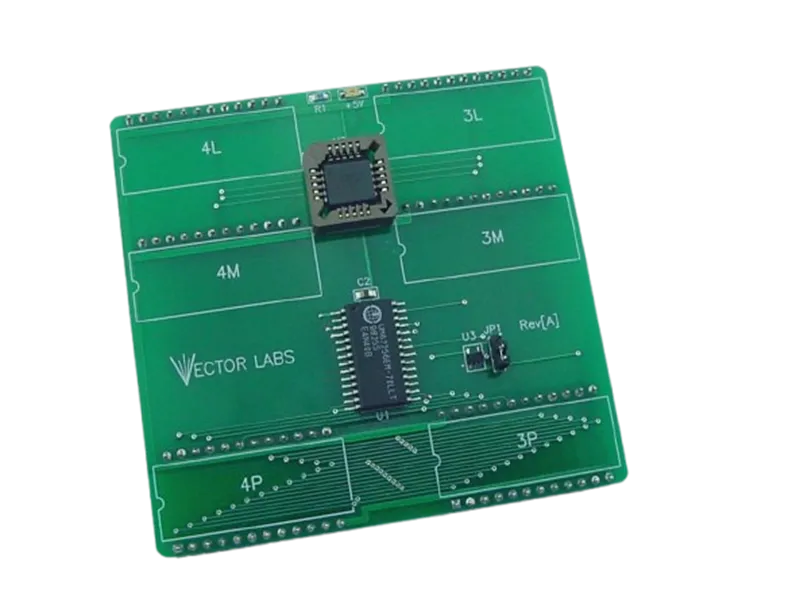
Star Wars / Empire Strikes Back 12K VRAM Upgrade The Star Wars / Empire Strikes Back 12K VRAM Upgrade is a reliable, plug-and-play solution that replaces the six 2K × 8 VRAM SRAM chips on your Atari Star Wars vector PCB. This modern upgrade reduces failure points, improves long-term reliability, and keeps your classic game running smoothly for years to come. Features · Compatibility · Installation Notes · FAQ Key Features Drop-in module replaces six 2K×8 VRAM SRAMs (12K total). Plug-and-play on socketed boards—no ROM or wiring changes. Modern components improve stability and longevity. Reduces heat and common failure points in the VRAM section. Compatibility Atari Star Wars (1983) and The Empire Strikes Back (1985) vector arcade PCBs/cabinets using the standard 12K VRAM section. Installation Notes Power off and discharge the cabinet before service; observe ESD precautions. Align the module with the VRAM positions and press firmly into the sockets. No soldering required if your original VRAM chips are socketed; if not, sockets must be installed by a qualified technician. FAQ Do I need to modify the board? No. On socketed boards the module drops in—no wiring or ROM changes. Will this change gameplay or graphics? No. It’s a reliability upgrade only; gameplay and timing remain original. What issues does this address? Replaces six aging VRAM chips that commonly cause intermittent video faults, instability, or no-boot conditions.

Star Wars | Empire Strikes Back Multigame Free Play and High Score Save Kit Features Easy install — No soldering, board modifications, or special wiring. Plug in and go! Star Wars PCB — Installs on an original Atari Star Wars PCB to play both games. Save your scores forever — Saves scores without batteries. High Score Save — Saves the Top 8 scores. Freeplay — No more coins or opening the coin door. Coin Up — Still supports coins if wanted. Attract Sounds — Hear the infamous music! Support — Can be used in Upright or Cockpit cabinets. Changing games: Hold the LEFT THUMB button for 2 seconds and release. Then hold the RIGHT THUMB button for 2 seconds and release. Game List Star Wars Empire Strikes Back Important Requires an original Atari Star Wars PCB for installation. Read the Star Wars | Empire Strikes Back Installation Guide (PDF) before installing. FAQ Which PCB is required? This kit installs on an original Atari Star Wars PCB. Which games are included? This multigame kit supports Star Wars and Empire Strikes Back. How do I switch between games? Hold the LEFT THUMB button for 2 seconds and release, then hold the RIGHT THUMB button for 2 seconds and release. Does it save high scores? Yes, it saves the Top 8 high scores permanently (no batteries required). Does it support Freeplay? Yes, Freeplay is supported. You can also still use coin-up if desired. Where can I download the Installation Guide? Download it here: Star Wars | Empire Strikes Back Multigame Installation Guide (PDF)

Star Wars | Empire Strikes Back Multigame Instruction Magnet This magnet applies and removes easily. It adheres to any ferrous metal (steel control panels, coin doors, etc.). For non-metal surfaces, use double-sided mounting tape (not included). Specifications Size: 3″ (L) × 2″ (W) Finish: Soft-laminated top Back: Strong magnetic backing

Customize Your Stratovox Free Play and High Score Save Kit Build your kit exactly how you want it. Choose a Wi-Fi Enabled Kit or a Standard Save Kit. You can also add a processor and/or a 40-pin socket — optional but recommended for easy installation. Learn More About This Kit Click a button to view details, tips, or the installation guide. Main Features Easy install: No soldering, board modifications, or special wiring—plug in and go. Save your scores forever: Uses serial EEPROM. High Score Save: Saves the Top 5 scores. Enter your initials: Initials entry supported. Attract sounds: Hear attract-mode audio during rotations. Copyright: Choose manufacturer or Highscoresaves branding. Freeplay: No more opening the coin door. Coin Up: Still supports coins/tokens. Attract Mode: Reduces screen burn. On-screen DIP settings: Menu-driven, no cabinet access required. ROM Saver: Remove original program ROMs if desired. Cabinet compatibility: Works in Upright and Cocktail cabinets. Additional Features Backup & Restore: Save and restore high scores. Separate score tables: Individual tables for 2, 3, and 4 lives. Important Installation Notes Socketed Z80 required: Install a 40-pin socket if needed. Read the Stratovox Installation Guide (PDF) before setup. FAQ Do I need to solder anything?No, installation is plug-and-play. Does it save scores permanently?Yes, stored in serial EEPROM. How many scores are saved?Top 5 scores with initials. Can I enter initials?Yes, initials entry is supported. Does it support attract sounds?Yes—enable attract sounds during rotations. Freeplay + Coin Up?Yes—Freeplay and Coin Up both supported. Will it work in my cabinet?Supports Upright & Cocktail cabinets. Backup and restore?Yes—backup/restore your high scores. Separate score tables?Yes—different tables for 2, 3, or 4 lives. Installation guide? Stratovox Installation Guide (PDF) Resources Stratovox — Installation Guide (PDF) HighScoreSaves YouTube Channel — Installation Tips HighScoreSaves Facebook Page HighScoreSaves eBay Store

Customize Your Super Multipede Multigame Free Play and High Score Save Kit Build your kit exactly how you want it. Choose a Wi-Fi Enabled Kit or a Standard Save Kit. You can also add a processor and/or a 40-pin socket — optional but recommended for easy installation. Learn More About This Kit Click a button to view details, tips, or the installation guide. Compatibility: This Super Multipede multigame kit installs on a Millipede PCB only. Main Features Easy install: No soldering, board modifications, or special wiring. Plug in and go. Save your scores forever: Uses reliable serial EEPROM (not failure-prone NVRAM or batteries). High Score Save: Centipede/Millipede save Top 8; Super Breakout & Warlords save Top 5. Separate score tables: Distinct tables for Centipede, Millipede, and Super Breakout. ROM revisions: Uses the most current ROM revisions. Attract sounds: Set to 25%, 50%, or 100% per game. Freeplay & Coin-Up: Play without coins or keep quarters enabled (Warlords is Freeplay only). Attract mode: Minimizes screen burn; no static screens. Menu-driven DIP settings: Change DIP switches without opening your cabinet. Cabinet support: Works in Upright or Cocktail; flips screen in cocktail mode for Centipede/Millipede. Super Breakout & Warlords use P1 side. Additional Features Backup & Restore: Save and restore high scores (great before/after parties). Reset button: Restart a game without powering off (enable in menu). Menu for game select: Hold P1 for 4 seconds, then release. Stealth Mode: Choose boot game (last played or from list). ROM Saver: All original program ROMs (1H–1M) can be removed. Copyright options: Choose original Atari or HighScoreSaves branding. Games List Centipede Millipede Super Breakout Warlords Important Installation Notes Compatibility: This Super Multipede multigame kit installs on a Millipede PCB only. Socketed 6502 required: If your 6502 isn’t socketed, install a 40-pin socket for this kit to work. Read the Super Multipede Installation Guide (PDF) before setup. Just the FAQ's Which PCB is required?This kit installs on a Millipede PCB only. Which games are included?The kit includes Centipede, Millipede, Super Breakout, and Warlords. Warlords 4-player support?Only 1 player is supported due to hardware limitations. How many scores are saved?Centipede & Millipede: Top 8Super Breakout & Warlords: Top 5 Does it support Freeplay and coin-up?Yes. Note: Warlords is Freeplay only. How to select a game?Hold P1 for 4 seconds, then release. What is Stealth Mode?Choose what game the kit boots into—either last played or fixed selection. What is ROM Saver?You may remove all original program ROMs (1H–1M); program runs from the kit. Where to download the Installation Guide?Super Multipede Installation Guide (PDF) Do I need a socketed CPU?Yes — a socketed 6502 is required. Resources Super Multipede — Installation Guide (PDF) HighScoreSaves YouTube Channel HighScoreSaves Facebook Page HighScoreSaves eBay Store

Super Multipede | Centipede | Millipede | Warlords | Super Breakout Multigame Instruction Magnet This magnet applies and removes easily. It adheres to any ferrous metal (steel control panels, coin doors, etc.). For non-metal surfaces, use double-sided mounting tape (not included). Specifications Size: 3″ (L) × 2″ (W) Finish: Soft-laminated top Back: Strong magnetic backing

Customize Your Super Pacman Free Play and High Score Save Kit Build your kit exactly how you want it. Choose a Wi-Fi Enabled Kit or a Standard Save Kit. You can also add a processor and/or a 40-pin socket—optional but recommended for easy installation. Learn More About This Kit Click a button to view details, tips, or the installation guide. Main Features Easy install: No soldering, board modifications, or special wiring—plug in and go. Save your scores forever: Uses a serial EPROM (not failure-prone NVRAM or batteries). High Score Save: Saves the Top 5 scores. Attract Sounds: Enable sound during the full attract rotation. Full Attract Sounds: Option includes dot-munching on the gameplay attract screen. Freeplay: No need to open the coin door. Coin Up: Still supports coins/tokens. Attract Mode: Minimize screen burn. On-screen DIP switches: No cabinet opening required. ROM Saver: Optionally remove program ROMs to reduce power draw. Cabinet compatibility: Works in Upright and Cocktail cabinets. Additional Features Separate score tables: Individual HSS tables for 2, 3, 4, or 5 lives. Backup & Restore: Save and restore your high scores. On-screen difficulty: Set from R0 “Normal” to RF “Auto Hard”. Important Installation Notes This kit requires a 6809E processor to run. Ensure your processor is socketed — add a 40-pin socket if needed. Read the Installation Guide (PDF) before installing. FAQ Do I need to solder anything?No, installation is fully plug-and-play. Does it save scores permanently?Yes — stored in serial EPROM. How many scores are saved?Top 5 high scores with initials. Does it support attract sounds?Yes — standard or full attract mode including dot-munching. Can I still use coins?Yes — works with Freeplay and Coin Up. Will it work in my cabinet?Yes — supports Upright and Cocktail. Backup and restore?Yes — perfect for party modes or competitions. Does it support different lives?Yes — separate tables for 2, 3, 4, and 5 lives. Required CPU?A socketed 6809E processor. Where is the install guide? Super Pacman Installation Guide (PDF) Resources Super Pacman — Installation Guide (PDF) HighScoreSaves YouTube Channel — Installation Tips HighScoreSaves Facebook Page HighScoreSaves eBay Store

Customize Your Swimmer Free Play and High Score Save Kit Build your kit exactly how you want it. Choose a Wi-Fi Enabled Kit or a Standard Save Kit. You can also add a processor and/or a 40-pin socket—optional but recommended for easy installation. Learn More About This Kit Click a button to view details, tips, or the installation guide. Main Features Easy install: No soldering, board modifications, or special wiring. Plug in and go! Save your scores forever: Uses a serial EPROM (not failure-prone NVRAM or batteries). High Score Save: Saves the Top 5 scores with initials. Attract Music: Enable music at 25%, 50%, or 100% intervals. Freeplay: No need to open the coin door. Coin Up: Still supports coins/tokens. Attract Mode: Reduces screen burn by avoiding static screens. Menu-driven DIP switches: Change DIP settings on-screen. ROM Saver: Remove the original program ROMs to save power. Cabinet compatibility: Works in Upright and Cocktail cabinets. Additional Features Backup & Restore: Back up high scores and restore later—perfect for party mode. Important Installation Notes Ensure your Z80 is socketed. If not, install a 40-pin socket. Read the Installation Guide (PDF) before installing. FAQ Do I need to solder anything?No, this kit is fully plug-and-play. Does it save scores permanently?Yes—stored in serial EPROM without batteries. How many scores are saved?Top 5 scores with initials. Does it support attract music?Yes—25%, 50%, or 100% intervals. Can I still use coins?Yes—works with Freeplay and Coin Up. Will it work in my cabinet?Yes—supports Upright and Cocktail. Backup and restore?Yes—save and restore high scores anytime. What is the ROM Saver feature?You can remove original program ROMs because the kit runs the code. CPU requirement?No special CPU required—just a socketed Z80. Where is the install guide? Swimmer Installation Guide (PDF) Resources Swimmer — Installation Guide (PDF) HighScoreSaves YouTube Channel — Installation Tips HighScoreSaves Facebook Page HighScoreSaves eBay Store

Customize Your Tapper Multigame Free Play and High Score Save Kit Build your kit exactly how you want it. Choose a Wi-Fi Enabled Kit or a Standard Save Kit. You can also add a processor and/or a 40-pin socket — optional but recommended for easy installation. Learn More About This Kit Click a button to view details, tips, or the installation guide. This is the Tapper & Timber Multigame Kit you’ve been waiting for! Control mapping is automatic depending on cabinet type. If installed in a Tapper cabinet (playing Timber) 1 player only for Timber Tap + move joystick left = chop left Tap + move joystick right = chop right If installed in a Timber cabinet (playing Tapper) Tapper uses Player 1 joystick Left/Right chop buttons act as tap Supports 2-player simultaneous Timber Main Features Easy install: Plug into Tapper or Timber PCB — no soldering required. Save your scores forever: Serial EEPROM (no failing batteries or NVRAM). High Score Save: Top 10 scores (optionally Top 3). Separate score tables: Unique HSS for each game menu. Attract Sounds: Adjustable at 25%, 50%, or 100%. Freeplay: Eliminates need to open coin door. Coin Up: Still supports tokens or coins. Attract Mode: Reduces monitor burn. Menu-driven DIP: On-screen — no cabinet opening required. ROM Saver: Original ROMs may be removed. Cabinet support: Works in Upright, Cocktail, or Cabaret. Backup & Restore: Save/restore scores — great before/after events. Reset Button: Soft restart without power-cycling. ROM Revisions: Uses latest versions. Choose boot game: Tapper, Timber, Root Beer Tapper, or Simpsons Tapper. Additional Features Choose starting lives. Select bonus thresholds: 10,000 / 20,000 / 40,000 / 80,000. Separate HSS for each lives setting. Choose original Midway logos or website branding. Normal DIP vs custom setting menus. Lock sub-menu to protect settings from guests. Stealth Mode: Boot to last played game or a chosen title. Game List Tapper Timber Root Beer Tapper Simpsons Tapper Important Installation Notes Socketed Z80 required: Install a 40-pin socket if not already socketed. Read the Tapper Multigame Installation Guide (PDF) before setup. Just the FAQ's Do I need to solder anything?No — completely plug-and-play. Does it save my high scores?Yes — Top 10, or set to Top 3. How does control mapping work?Automatically adjusts for Tapper or Timber cabinets. Can I still use coins?Yes — Freeplay and Coin-Up both supported. Does it support all cabinet types?Upright, Cocktail, and Cabaret supported. What games are included?Tapper, Timber, Root Beer Tapper, Simpsons Tapper. Can I back up and restore scores?Yes — built-in Backup & Restore. What is Stealth Mode?Boot straight to the last played or selected title. What processor is required?A socketed Z80 CPU. Where is the Installation Guide? Tapper Multigame Installation Guide (PDF) Resources Tapper Multigame — Installation Guide (PDF) HighScoreSaves YouTube Channel HighScoreSaves Facebook Page Official HighScoreSaves eBay Store

Tapper Multigame Instruction Magnet This magnet applies and removes easily. It adheres to any ferrous metal (steel control panels, coin doors, etc.). For non-metal surfaces, use double-sided mounting tape (not included). Specifications Size: 3″ (L) × 2″ (W) Finish: Soft-laminated top Back: Strong magnetic backing

Customize Your Targ Multigame Free Play and High Score Save Kit Build your kit exactly how you want it. Choose a Wi-Fi Enabled Kit or a Standard Save Kit. You can also add a processor and/or a 40-pin socket—optional but recommended for easy installation. Learn More About This Kit Click a button to view details, tips, or the installation guide. Features Easy install – No soldering, board modifications, or special wiring. Just plug the kit in and go! Save your scores forever – Uses a serial EEPROM (no failure-prone NVRAM or batteries). High Score Save – Saves the Top 5 scores with initials. Attract Sounds – Hear what you’ve been missing; set to 25%, 50%, or 100% of the attract rotation. Freeplay – No more coins or opening the coin door to start a game. Coin Up – Supports quarters or tokens if desired. Attract Mode – Minimize screen burn; no more static screens. Copyright message – Choose original manufacturer or Highscoresaves branding. Menu-driven DIP – On-screen DIP settings; no cabinet opening required. ROM Saver – Original program ROMs can be removed; program lives on the save kit. Cabinet support – Works in Upright or Cocktail cabinets. Additional Features Backup and Restore – Back up high scores and restore later (great before/after parties). Reset Button – Restart a game without powering off (enable in menu). Separate score tables – Different tables for 2, 3, 4, or 5 lives. Fast Boot – No waiting for initialization. Stealth Mode – Boots straight to the game. Important Ensure your 6502 is socketed. If not, install a 40-pin socket for the kit to work. Read the Installation Guide (PDF) before installing. Installs on an original Targ arcade PCB. Game List Targ Spectar (sounds match Targ) Side Trak (similar to Exidy’s Crash; car replaces the train) Just the FAQ's Do I need to solder anything? No, this kit is plug-and-play. No soldering or board modifications are required. Does it save my high scores? Yes, the kit saves the Top 5 scores with initials. Can I still use coins? Yes, the kit supports both Freeplay and Coin Up modes. Does it support attract sounds? Yes, you can enable attract sounds at 25%, 50%, or 100% of the rotation. What processors does it work with? A socketed 6502 processor is required. Will it work in my cabinet? Yes, it works in both Upright and Cocktail cabinets. Can I back up and restore scores? Yes, you can back up and restore scores at any time—great for events. What’s Stealth Mode? Stealth Mode boots the kit directly into the game, bypassing menus. What games are included? This multigame kit supports Targ, Spectar, and Side Trak. Where can I download the installation guide? You can download it here: Targ Multigame Installation Guide (PDF)

Customize Your Tempest Multigame Free Play and High Score Save Kit Build your kit exactly how you want it. Choose a Wi-Fi Enabled Kit or a Standard Save Kit. You can also add a processor and/or a 40-pin socket—optional but recommended for easy installation. Learn More About This Kit Click a button to view details, tips, or the installation guide. Main Features Easy install: No soldering, board modifications, or special wiring. Just plug in and play. Save your scores forever: Uses reliable serial EEPROM (not failure-prone NVRAM or batteries). High Score Save: Stores the Top 8 scores. Attract Sounds: Set to 25%, 50%, or 100% of the attract rotation. Freeplay: No more coins or opening the coin door. Coin Up: Supports quarters or tokens if desired. Attract Mode: Reduces screen burn by avoiding static screens. Copyright Message: Choose original manufacturer or Highscoresaves. On-screen DIP settings: Change dips via menu; no cabinet pull-out required. ROM Saver: Original program ROMs can be removed (program is on the save kit). Cabinet support: Works in Upright and Cocktail cabinets. Additional Features Backup and Restore: Save and restore high scores (perfect before/after parties). Reset Button: Restart without powering off (enable in menu). Separate score tables: Different HSS tables for 2, 3, 4, or 5 lives. Fast boot: No long initialization wait. Stealth Mode: Boots straight into the game. Choose Your Level: Start up to level 81. Extended level-select time: 60 seconds (instead of 10). Includes the latest ROM revision. Game List Tempest Tempest Tubes Important Installation Notes Socketed 6502 required: If your 6502 isn’t socketed, install a 40-pin socket for the kit to work. Read the Tempest Multigame Installation Guide (PDF) before setup. FAQ Do I need to solder anything?No. The kit is plug-and-play if your 6502 is socketed. Otherwise, install a 40-pin socket first. What’s the difference between the Wi-Fi and Standard kits?The Wi-Fi kit uploads scores online and syncs to your web page. The Standard kit saves scores locally only. Can I upgrade to Wi-Fi later?No. Wi-Fi hardware must be included at purchase—there’s no upgrade path later. Will it work in my cabinet?Yes. The kit supports both Upright and Cocktail Tempest cabinets. How many scores does it save?It saves the Top 8 scores with initials. Can I back up and restore scores?Yes. Backup & Restore lets you save before events and restore afterward. Does it support Freeplay and Coin Up?Yes. You can use Freeplay or keep coins/tokens enabled. What’s Stealth Mode?Stealth Mode boots straight to the game, bypassing setup screens. Can I select starting levels?Yes. Level Select lets you start up to level 81, with extended 60-second selection time. Where do I get the installation guide?Download the Tempest Multigame Installation Guide (PDF) Resources Tempest Multigame — Installation Guide (PDF) HighScoreSaves YouTube Channel — Installation Tips HighScoreSaves Facebook Page HighScoreSaves eBay Store

Customize Your Time Pilot ’84 Free Play and High Score Save Kit Build your kit exactly how you want it. Choose a Wi-Fi Enabled Kit or a Standard Save Kit. You can also add a processor and/or a 40-pin socket—optional but recommended for easy installation. Learn More About This Kit Click a button to view details, tips, or the installation guide. Main Features Easy install — No soldering, board modifications, or special wiring. Plug in and go. Save your scores forever — Uses reliable serial EEPROM (not failure-prone NVRAM or batteries). High Score Save — Stores the Top 5 scores. Attract Sounds — Hear what you’ve been missing! Enable sound at 100% of the attract screen rotation. Freeplay — No more coins or opening the coin door. Coin Up — Still supports coins if desired. Attract Mode — Minimizes screen burn by avoiding static screens. On-screen DIP settings — Menu-driven; no cabinet pull-out to change physical dip switches. ROM Saver — Original program ROMs can be removed if desired. Cabinet support — Works in Upright and Cocktail cabinets. Additional Features Separate score tables — 16 different HSS tables (one for every difficulty and lives setting). Backup and Restore — Save and restore high scores (perfect before/after parties). Important Installation Notes This kit requires a 6809E CPU to run. Ensure your processor is socketed; if not, install a 40-pin socket for the kit to work. Read the Installation Guide (PDF) before you install. FAQ Do I need to solder anything to install this kit? No. Installation is plug-and-play as long as your 6809E CPU is socketed. If it isn’t, install a 40-pin socket first. What’s the difference between the Wi-Fi and Standard kits? The Wi-Fi kit can upload and view scores online and sync them to your personal web page. The Standard kit saves locally only. Can I upgrade to Wi-Fi later? No. The Wi-Fi hardware must be populated at purchase—there’s no post-purchase upgrade path. How many scores are saved? This Time Pilot ’84 kit saves the Top 5 scores, with 16 different HSS tables depending on difficulty and lives setting. Will this work in my cabinet? Yes. Fully compatible with Upright and Cocktail Time Pilot ’84 cabinets. Can I back up or restore high scores? Yes. Use the Backup/Restore feature to save scores before events and restore afterward. Does it support attract sounds? Yes. You can enable attract sounds at 100% of the rotation cycle. What’s the ROM Saver feature? You may remove the original program ROMs if desired since the kit runs the program directly. Does it support Freeplay and Coin Up? Yes. Enable Freeplay or continue using coins/tokens if preferred. Where can I find the installation guide? You can download it here: Time Pilot ’84 Installation Guide (PDF) . Resources Time Pilot ’84 — Installation Guide (PDF) HighScoreSaves YouTube Channel — Installation Tips HighScoreSaves Facebook Page HighScoreSaves eBay Store

Customize Your Time Pilot Free Play and High Score Save Kit Build your kit exactly how you want it. Choose a Wi-Fi Enabled Kit or a Standard Save Kit. You can also add a processor and/or a 40-pin socket—optional but recommended for easy installation. Learn More About This Kit Click a button to view details, tips, or the installation guide. Main Features Easy install: Plug-and-play with a socketed Z80 board; soldering a 40-pin socket may be required otherwise. Save your scores forever: Uses reliable serial EEPROM (not failure-prone NVRAM or batteries). High Score Save: Stores the Top 5 scores. Attract Sounds: Hear what you’ve been missing; enable sound during attract rotation. Copyright: Switch between manufacturer logo or Highscoresaves logo on attract screen. Freeplay: No more coins or opening the coin door. Coin Up: Still supports coins if desired. Attract Mode: Minimizes screen burn by avoiding static screens. On-screen DIP settings: Menu-driven; no cabinet pull-out to change physical DIP switches. ROM Saver: You can remove original program ROMs if desired. Cabinet compatibility: Works in Upright and Cocktail cabinets. Additional Features Backup and Restore: Save and restore high scores (perfect before/after parties). Separate score tables: Different HSS tables for 2, 3, or 4 lives. Fast Boot: Self-test accessible via main menu or by setting all PCB DIP switches to OFF. Important Installation Notes Ensure your Z80 CPU is socketed; if not, install a 40-pin socket for the kit to work. Read the Installation Guide (PDF) before you install. FAQ Do I need to solder anything to install this kit? No. Installation is plug-and-play as long as your Z80 is socketed. If it isn’t, install a 40-pin socket first. What’s the difference between Wi-Fi and Standard kits? The Wi-Fi kit uploads scores online to your personal web page. The Standard kit saves scores locally only. Can I upgrade to Wi-Fi later? No. Wi-Fi hardware must be chosen at purchase—no upgrade path exists. How many scores are saved? The Time Pilot kit saves the Top 5 scores with initials. Will this work in my cabinet? Yes. Fully compatible with Upright and Cocktail Time Pilot cabinets. Can I back up or restore scores? Yes. Back up before parties and restore afterward. Does it support attract sounds? Yes—sound can be enabled during the attract cycle. What is the ROM Saver feature? You may remove the original ROMs since the kit runs the program. Does it support Freeplay and Coin Up? Yes—Freeplay and coin operation both work. Where is the install guide? Time Pilot Installation Guide (PDF) Resources Time Pilot — Installation Guide (PDF) HighScoreSaves YouTube Channel — Installation Tips HighScoreSaves Facebook Page HighScoreSaves eBay Store

Customize Your Tron Multigame Free Play and High Score Save Kit Build your kit exactly how you want it. Choose a Wi-Fi Enabled Kit or a Standard Save Kit. You can also add a processor and/or a 40-pin socket—optional but recommended for easy installation. Learn More About This Kit Click a button to view details, tips, or the installation guide. Main Features Easy install: No soldering, board modifications, or special wiring. Plug in and go on your Tron PCB. 8-digit scoring: Score up to 99,999,999 — NO rollover at 999,999. Save your scores forever: Uses reliable serial EEPROM (not failure-prone NVRAM or batteries). High Score Save: Stores the Top 10 scores. Separate score tables: Individual high-score tables for each of the 4 game menus. Attract Sounds: Set to 25%, 50%, or 100%. Freeplay: No more coins or opening the coin door. Coin Up: Still supports coins if desired. Attract Mode: Minimizes screen burn by avoiding static screens. On-screen DIP settings: Menu-driven; no cabinet pull-out required. ROM Saver: Original program ROMs may be removed. Cabinet support: Works in Upright and Cabaret cabinets. Additional Features Backup & Restore: Save and restore scores — perfect before/after parties. Reset Button: Restart a game without power cycling. Latest ROM Revisions: Includes Tron 8/09 and latest Satan’s Hollow. Stealth Mode: Boot directly into last-played game or selected title. Satan’s Hollow shield options: Activate via Spinner, Up, Down, or Player 2 button (menu-selectable). Game List Tron Satan’s Hollow Important Installation Notes Socketed Z80 required: If your Z80 isn’t socketed, install a 40-pin socket for this kit to work. Read the Tron & Satan’s Hollow Multigame Installation Guide (PDF) before setup. FAQ Is installation plug-and-play?Yes. No soldering or board mods required — just ensure your Z80 is socketed. What’s the benefit of 8-digit scoring?Scores can reach 99,999,999 without rolling over at 999,999 — perfect for marathon players. Do Tron and Satan’s Hollow keep separate scores?Yes — each game has its own high-score table. Can I use Freeplay and still accept coins?Yes — Freeplay and Coin Up can be enabled simultaneously. Can I back up and restore high scores?Yes — Backup/Restore is built in. Can I choose which game it boots into?Yes — Stealth Mode lets you boot into last played or your selected title. Which cabinets are supported?Works in Upright and Cabaret TRON cabinets. What processor is required?A socketed Z80 CPU is required. Are latest ROM revisions included?Yes — includes Tron 8/09 and the latest Satan’s Hollow revisions. Where can I download the installation guide? Tron & Satan’s Hollow Multigame Installation Guide (PDF) Resources Tron Multigame — Installation Guide (PDF) HighScoreSaves YouTube Channel — Installation Tips HighScoreSaves Facebook Page HighScoreSaves eBay Store

Tron | Satans Hollow Multigame Instruction Magnet This magnet applies and removes easily. It adheres to any ferrous metal (steel control panels, coin doors, etc.). For non-metal surfaces, use double-sided mounting tape (not included). Specifications Size: 3″ (L) × 2″ (W) Finish: Soft-laminated top Back: Strong magnetic backing